Step Folding Indicators for Power Query Online
Query Folding

One of the most powerful features in Power Query is the ability for it to take relational operations — things like grouping, filtering, etc. — and pass to the data source the ones that it knows how to handle. We call this ‘folding’, and it allows users to be able to avoid retrieving data that they don’t want to, speeding up processing immensely.
These indicators will allow you to understand which steps fold, and which steps don’t. When you make a change that breaks folding, it will become obvious. This allows you to resolve issues more quickly and easily, avoid performance issues in the first place, and have better insight into your queries.
This feature will become available in Power Query Desktop at some point in the future.
Indicators
Step folding indicators use an underlying query plan, and require it to be able to get information about the query to report it. Currently the query plan only supports tables, so some cases (lists, records, primitives) will not report as folding or not. Similarly, constant tables will report as opaque.
Folding
The folding indicator tells you that the query up to this step will be evaluated by the data source.
Not folding
The not folding indicator tells you that some part of the query up to this step will be evaluated outside the data source. You can compare it with the last folding indicator, if there is one, to see if you can rearrange your query to be more performant.
Might fold

Might fold indicators are uncommon. They mean that a query ‘might’ fold. They indicate either that folding/not folding will be determined at runtime, when pulling results from the query, and that the query plan is dynamic. These will likely only appear with ODBC or OData connections.
Opaque

Opaque indicators tell you that the resulting query plan is inconclusive for some reason. It generally indicates that there is a true ‘constant’ table, or that that transform or connector is not supported by the indicators and query plan tool.
Unknown
Unknown indicators represent an absence of query plan, either due to an error or attempting to run the query plan evaluation on something other than a table (such as a record, list, or primitive).
Example
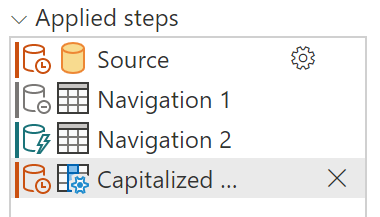
Using the Northwind sample database, the example below shows that the first step doesn’t fold, the second step is inconclusive, and that the third step folds.
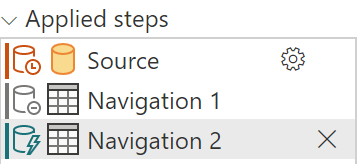
You can see that the initial steps don’t fold, but the final step generated when you load data initially does fold. How the first few steps (Source, sometimes Navigation) are handled depends on the connector. With SQL, for example, it’s handled as a catalog table value, which doesn’t fold. However, as soon as you select data for that connector it will.
Conversely, this can also mean that your query folds up to a point and then stops folding. Unlike in the case where you have a folding indicator for the step, which shows that everything folds, when you have a not folding indicator it doesn’t mean that everything doesn’t fold — instead, it means that “not everything” folds. Generally, everything up to the last folding indicator will fold, with additional operations happening after.
Modifying the example from above, you can give a transform that never folds — Capitalize Each Word. In step folding indicators, you will see that you have the exact same indicators as above, except the final step doesn’t fold. Everything up to this final step will be performed on the data source, while the final step will be performed locally.