Synapse RBAC Roles

Synapse RBAC extends the capabilities of Azure RBAC for Synapse workspaces and their content.
What can I do with Synapse RBAC?
Here are some examples of what you can do with Synapse RBAC:
Allow a user to publish changes made to Apache Spark notebooks and jobs to the live service.
Allow a user to run and cancel notebooks and spark jobs on a specific Apache Spark pool.
Allow a user to use specific credentials so they can run pipelines secured by the workspace system identity and access data in linked services secured with credentials.
Allow an administrator to manage, monitor, and cancel job execution on specific Spark Pools.
How Synapse RBAC works
Like Azure RBAC, Synapse RBAC works by creating role assignments. A role assignment consists of three elements: a security principal, a role definition, and a scope.
Security Principals
A security principal is a user, group, service principal, or managed identity.
Roles
A role is a collection of permissions or actions that can be performed on specific resource types or artifact types.
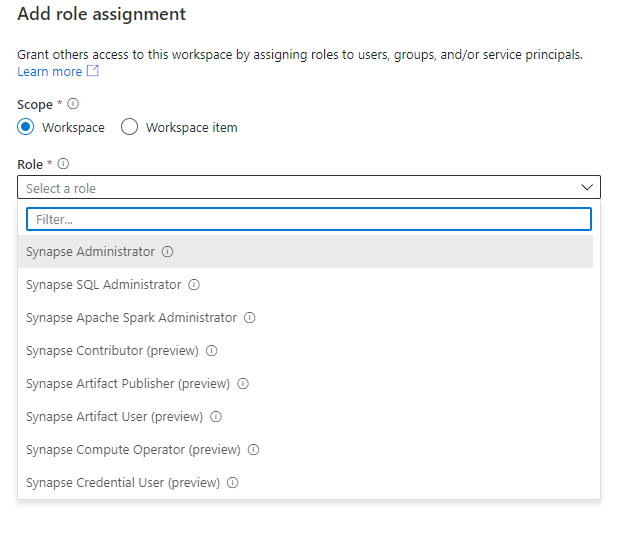
Synapse provides built-in roles that define collections of actions that match the needs of different personas:
Administrators can get full access to create and configure a workspace
Developers can create, update and debug SQL scripts, notebooks, pipelines, and dataflows, but not be able to publish or execute this code on production compute resources/data
Operators can monitor and manage system status, application execution and review logs, without access to code or the outputs from execution.
Security staff can manage and configure endpoints without having access to code, compute resources or data.
Learn more about the built-in Synapse roles.
Built-in Synapse RBAC roles and scopes
Note — The new Synapse RBAC roles and lower-level scopes are currently in preview. You are encouraged to use these new roles and scopes, which are fully supported, and to provide feedback on their use.
Synapse Administrator
Permissions — Full Synapse access to serverless SQL pools, Apache Spark pools, and Integration runtimes. Includes create, read, update, and delete access to all published code artifacts. Includes Compute Operator, Linked Data Manager, and Credential User permissions on the workspace system identity credential. Includes assigning Synapse RBAC roles. In addition to Synapse Administrator, Azure Owners can also assign Synapse RBAC roles. Azure permissions are required to create, delete, and manage compute resources.
Can read and write artifacts
Can do all actions on Spark activities.
Can view Spark pool logs
Can view saved notebook and pipeline output
Can use the secrets stored by linked services or credentials
Can connect to SQL serverless endpoints with SQL db_datareader, db_datawriter, connect, and grant permissions
Can assign and revoke Synapse RBAC roles at current scope
Scopes — Workspace, Spark pool, Integration runtime, Linked service, Credential
Synapse SQL Administrator
Permissions — Full Synapse access to serverless SQL pools. Create, read, update, and delete access to published SQL scripts, credentials, and linked services. Includes read access to all other published code artifacts. Doesn’t include permission to use credentials and run pipelines. Doesn’t include granting access.
Can do all actions on SQL scripts
Can connect to SQL serverless endpoints with SQL db_datareader, db_datawriter, connect, and grant permissions
Scope — Workspace
Note — While Synapse RBAC is used to manage access to published SQL scripts, it provides only limited access control to serverless SQL pools and is not used to control access to dedicated SQL pools. Access to SQL pools is primarily controlled using SQL security.
Synapse Apache Spark Administrator
Permissions —Full Synapse access to Apache Spark Pools. Create, read, update, and delete access to published Spark job definitions, notebooks and their outputs, and to libraries, linked services, and credentials. Includes read access to all other published code artifacts. Doesn’t include permission to use credentials and run pipelines. Doesn’t include granting access.
Can do all actions on Spark artifacts
Can do all actions on Spark activities
Scopes — Workspace, Spark pool
Synapse Contributor
Permissions — Full Synapse access to Apache Spark pools and Integration runtimes. Includes create, read, update, and delete access to all published code artifacts and their outputs, including credentials and linked services. Includes compute operator permissions. Doesn't include permission to use credentials and run pipelines. Doesn't include granting access.
Can read and write artifacts
Can view saved notebook and pipeline output
Can do all actions on Spark activities
Can view Spark pool logs
Scopes — Workspace, Spark pool, Integration runtime
Synapse Artifact Publisher
Permissions — Create, read, update, and delete access to published code artifacts and their outputs. Doesn't include permission to run code or pipelines, or to grant access.
Can read published artifacts and publish artifacts
Can view saved notebook, Spark job, and pipeline output
Scopes — Workspace
Synapse Artifact User
Permissions — Read access to published code artifacts and their outputs. Can create new artifacts but can't publish changes or run code without additional permissions.
Scopes — Workspace
Synapse Compute Operator
Permissions — Submit Spark jobs and notebooks and view logs. Includes canceling Spark jobs submitted by any user. Requires additional use credential permissions on the workspace system identity to run pipelines, view pipeline runs and outputs.
Can submit and cancel jobs, including jobs submitted by others
Can view Spark pool logs
Scopes — Workspace, Spark pool, Integration runtime
Synapse Credential User
Permissions — Runtime and configuration-time use of secrets within credentials and linked services in activities like pipeline runs. To run pipelines, this role is required, scoped to the workspace system identity.
Scoped to a credential, permits access to data via a linked service that is protected by the credential (also requires compute use permission)
Allows execution of pipelines protected by the workspace system identity credential(with additional compute use permission)
Scopes — Workspace, Linked Service
Credential
Synapse Linked Data Manager
Permissions — Creation and management of managed private endpoints, linked services, and credentials. Can create managed private endpoints that use linked services protected by credentials
Scopes — Workspace
Synapse User
Permissions — List and view details of SQL pools, Apache Spark pools, Integration runtimes, and published linked services and credentials. Doesn't include other published code artifacts. Can create new artifacts but can't run or publish without additional permissions.
Can list and read Spark pools, Integration runtimes.
Scopes — Workspace, Spark pool Linked service Credential
Scopes
A scope defines the resources or artifacts that the access applies to. Synapse supports hierarchical scopes. Permissions granted at a higher-level scope are inherited by objects at a lower level. In Synapse RBAC, the top-level scope is a workspace. Assigning a role with workspace scope grants permissions to all applicable objects in the workspace.
Current supported scopes within a workspace are: Apache Spark pool, Integration runtime, linked service, and credential.
Access to code artifacts is granted with workspace scope. Granting access to collections of artifacts within a workspace will be supported in a later release.
Resolving role assignments to determine permissions
A role assignment grants the principal the permissions defined by the role at the specified scope.
Synapse RBAC is an additive model like Azure RBAC. Multiple roles may be assigned to a single principal and at different scopes. When computing the permissions of a security principal, the system considers all roles assigned to the principal and to groups that directly or indirectly include the principal. It also considers the scope of each assignment in determining the permissions that apply.
Enforcing assigned permissions
In Synapse Studio, specific buttons or options may be grayed out or a permissions error may be returned when attempting an action if you don’t have the required permissions.
If a button or option is disabled, hovering over the button or option shows a tooltip with the required permission. Contact a Synapse Administrator to assign a role that grants the required permission. You can see the roles that provide specific actions here.
Who can assign Synapse RBAC roles?
Only a Synapse Administrator can assign Synapse RBAC roles. A Synapse Administrator at the workspace level can grant access at any scope. A Synapse Administrator at a lower-level scope can only grant access at that scope.
When a new workspace is created, the creator is automatically given the Synapse Administrator role at workspace scope.
Where do I manage Synapse RBAC?
Synapse RBAC is managed from within Synapse Studio using the Access control tools in the Manage hub.
References
Azure Synapse RBAC roles - Azure Synapse Analytics | Microsoft Learn


